Savings Guide: Promo Codes, Mobile Checkout, & VIP Rewards PointsUpdated 2 hours ago
Looking to save on your next order? At Fuse Lenses, we make it easy to get top-tier optical quality at a price that leaves cash in your pocket for your next outdoor adventure.
Whether you are trying to redeem a discount code on your phone or earn cash back on every purchase, here is everything you need to know about stacking up savings with Fuse!
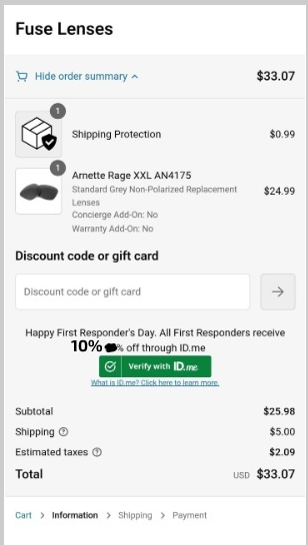
How to Apply a Discount Code or Gift Card on Mobile
Shopping on your phone? Finding the promo code box is simple; it's just tucked inside the order summary dropdown:
Proceed to Checkout: Tap the Checkout button from your cart.
Open Order Summary: At the top of the mobile checkout screen, tap "Add Points/Discounts - Order Summary".
Apply Code or Points: The dropdown will expand to show the promo code/gift card entry box, as well as your VIP Rewards points slider (if you are signed into your Fuse account).
Hit Apply: Type or paste your code and watch your total drop!
Ways to Get a Fuse Discount Code
Sign-Up Discounts: First time shopping with us? Sign up for our email or SMS text list to grab an instant discount on your first order. (when available)
Exclusive Insider Sales: VIP subscribers are always the first to know about upcoming flash sales, seasonal promos, holiday discounts, and new lens drop announcements.
Earn Cash Back on Every Order: Fuse VIP Rewards Program
Did you know you can earn money off every single purchase just by having a free Fuse account? Our VIP Rewards program puts cash back into your account balance automatically.
| Rewards Tier | Qualification | Non-Prescription Order Cash Back | Prescription Order Cash Back |
| Explorer | Your 1st and 2nd orders | 2.5% Cash Back | 1% Cash Back |
| Trailblazer | Unlocked on your 3rd order | 5.0% Cash Back | 2.5% Cash Back |
| Legend | Unlocked after your 5th order | 7.0% Cash Back | 5% Cash Back |
Pro Tip: Make sure you are logged into your Fuse account before checking out! You can easily apply your accumulated rewards cash directly to your cart using the points slider in the Order Summary section.
Frequently Asked Questions
Where do I put my discount code on an iPhone or Android phone?
Tap the "Add Points/Discounts - Order Summary" link at the very top of the mobile checkout page to reveal the promo code box!
Do I earn VIP rewards cash back on prescription orders?
Yes! Prescription orders earn cash back across all tiers: Explorer (1%), Trailblazer (2.5%), and Legend (5%).
Can I use both a discount code and my Fuse VIP Rewards points on the same order?
Absolutely! You can redeem your earned VIP rewards points alongside eligible promotional codes at checkout.